Building Plannable: Autonomous PM-AI Agent
Building Plannable: Autonomous PM-AI Agent
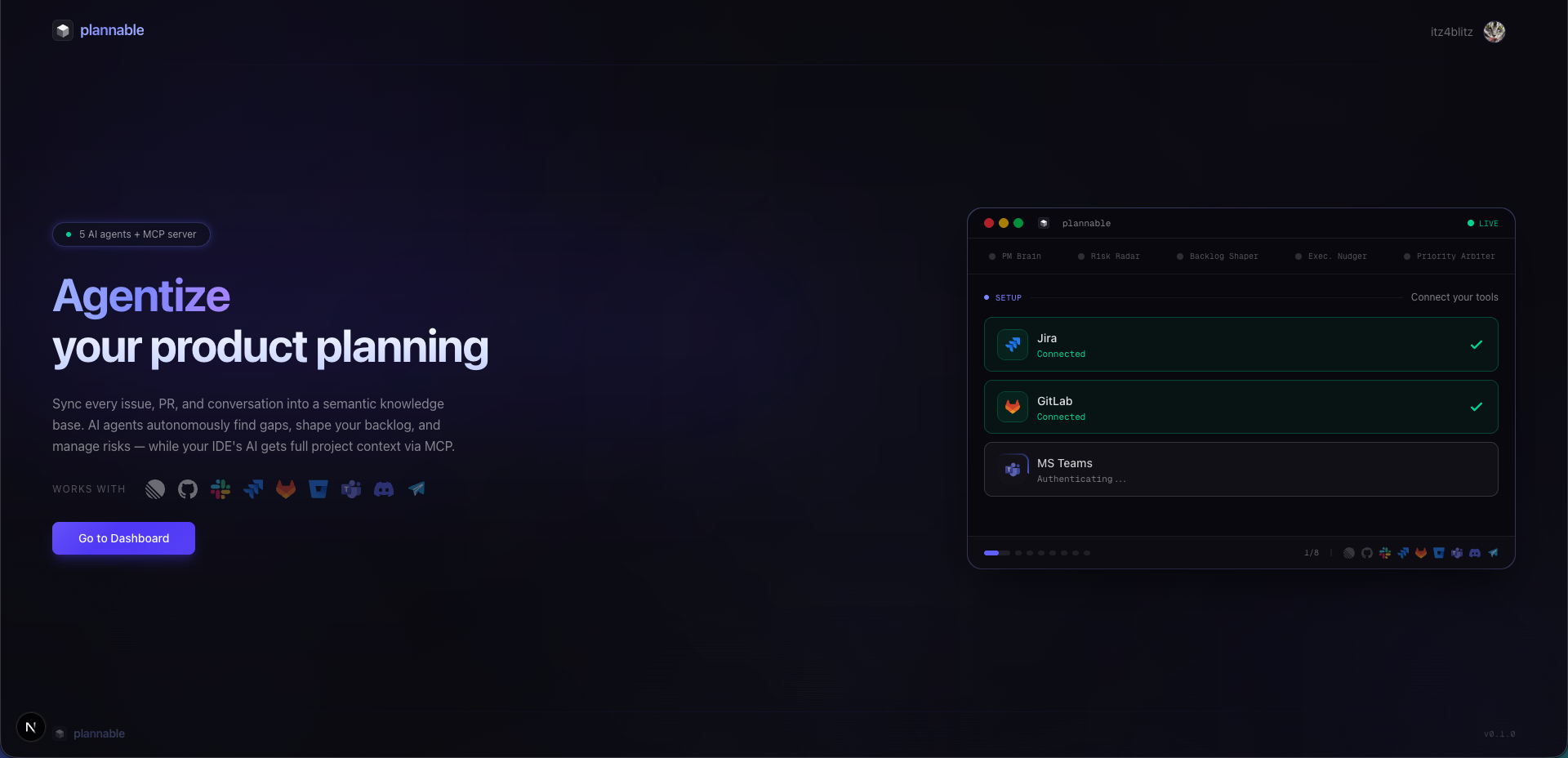
The Problem
Every product team faces the same frustrations. Your project management tool is just a to-do list — it tracks what needs to happen, but not why it matters. Your backlog is a mess of vague tickets that nobody wants to pick up. Decisions get made in your chat tool threads and lost forever. Risks surface at the worst possible moment, not when there's time to do something about them.
And the biggest frustration of all: your AI coding assistant knows nothing about your product. It can't tell you why a feature matters, what decisions led to it, or what could go wrong. It's writing code in a vacuum.
Plannable is my attempt to fix this.
What is Plannable?
Plannable is an autonomous PM-AI agent — the product manager you wish you had. It never sleeps, never forgets, and is always working to keep your project on track.
Here's what makes it different from every other project management tool you've used:
It understands context, not just content. Plannable connects to your existing tools — Linear, GitHub, Slack — and builds a unified product knowledge base. But it doesn't just store data. It understands relationships: which issues support which outcomes, which decisions led to which features, which risks matter and when.
It works while you sleep. Five AI agents run continuously, analyzing your project from every angle. They're finding gaps, surfacing risks, shaping your backlog, and keeping priorities aligned with business goals. You don't need to check dashboards — Plannable comes to you with actionable insights.
It gives your AI developer a brain. When your AI coding assistant connects to Plannable, it suddenly understands your product. It knows the outcome behind each ticket, the decisions that shaped it, and what could go wrong. Your AI stops writing code in a vacuum and starts writing code that matters.
The Dashboard
The dashboard is your command center — the place where Plannable's intelligence becomes visible. It's designed around signals, not static metrics. Everything you see is actionable.
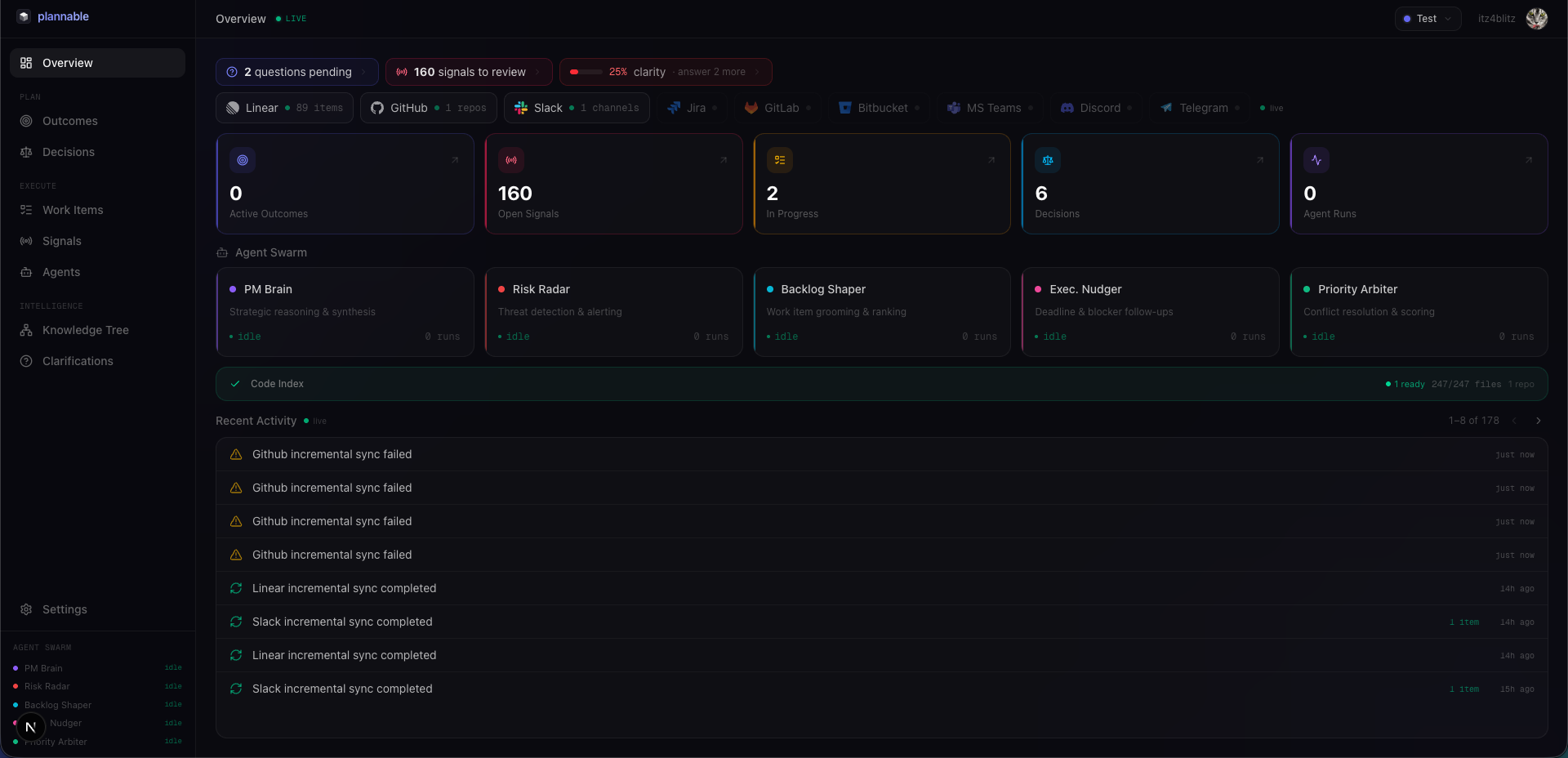
At the top, you see outcomes — your business goals with progress indicators. Not just "50% complete" but actual progress against hypotheses. Are users behaving the way you expected? Are you seeing the signals you predicted?
Below outcomes, signals flow in real-time. These are the things that need your attention: stalled PRs that are blocking progress, tickets that have been idle too long, priority conflicts, scope creep warnings. Each signal is ranked by severity and comes with a recommendation.
The agent status panel shows what your five AI agents are working on. You can see PM Brain answering questions, Backlog Shaper grooming tickets, Risk Radar scanning for issues. Everything is transparent.
And the quick actions bar lets you trigger anything: ask PM Brain a question, run a backlog health scan, make a decision, report a blocker. You're always in control.
The Knowledge Tree
Every piece of information in Plannable is connected in a semantic knowledge tree — not just a flat list of issues and PRs, but an interconnected web of relationships that captures why things matter.
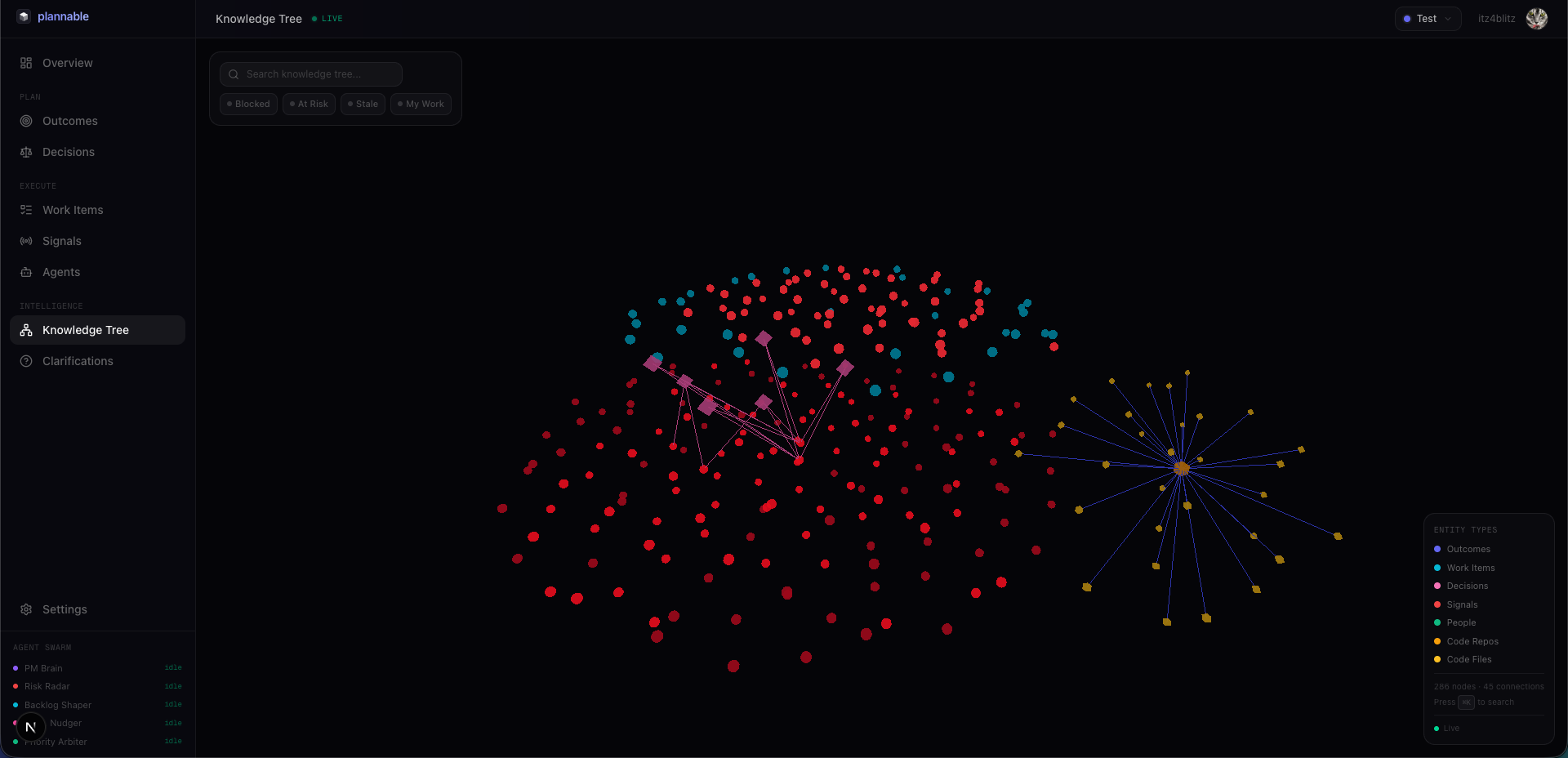
At the root are your outcomes — the business goals you're trying to achieve. Linked to each outcome are the hypotheses you're testing, the signals that indicate progress or problems, and the decisions that shaped the approach.
Below outcomes sit your epics and features, and below those are the issues that make them up. Each issue connects to:
- The outcome it supports
- The decisions that led to it
- The PRs that implement it
- Any risks associated with it
- The conversations (Slack threads) where it was discussed
This isn't just metadata — it's a living web of context that the AI agents use to understand your project deeply. When the PM Brain answers a question, it traverses this knowledge tree. When Risk Radar scans for issues, it understands which outcomes could be affected. When your AI developer asks about a ticket, it sees the full context of why that work matters.
How It Works
Plannable operates on three core principles:
Outcomes, not tasks. You define business outcomes with clear hypotheses and success criteria. Plannable tracks progress against these goals, not just ticket completion. A ticket can be "done" but if it didn't move the needle on the outcome, Plannable knows.
Signals, not dashboards. Instead of you checking dashboards every morning, Plannable comes to you. It surfaces important developments — stalled PRs, velocity changes, scope creep, team overload — ranked by severity with recommendations. Think of it as a proactive alert system that actually understands your project.
Decisions, not tribal knowledge. Every product decision is captured with its rationale, alternatives considered, and expected impact. This becomes searchable knowledge that anyone on the team can query. No more "wait, why did we decide to build it this way?" conversations.
The Agent Swarm
Five specialized AI agents work together as a team, each with a distinct role:
PM Brain — The strategic center. Answers questions, generates reports, maintains the product vision. Need to know the current status of your roadmap? Ask PM Brain. Wondering what the top priorities should be next quarter? PM Brain has answers. It understands the full knowledge tree and can synthesize insights from across your project.
Backlog Shaper — Continuously improves your backlog. Rewrites vague tickets into actionable items, splits oversized epics, flags tickets that have been sitting idle (zombie tickets), and catches duplicates that should be consolidated. Your backlog actually becomes useful. It analyzes relationships between tickets to find gaps and inconsistencies.
Execution Nudger — Keeps things moving. Detects when PRs are stalled, sends reminders to owners, and escalates persistent blockers. It respects working hours and knows when to push vs. when to wait. It understands code dependencies and can identify when one stalled PR is blocking multiple other pieces of work.
Priority Arbiter — Continuously re-evaluates priorities based on business impact, user impact, effort, and risk. Every change comes with a clear explanation — no more mysterious reordering without context. It uses the knowledge tree to understand cascading effects of priority changes.
Risk Radar — Monitors across multiple dimensions: delivery risks, technical risks, team risks, and stakeholder risks. Creates alerts when thresholds are breached, so problems get flagged early. It traces risks through the knowledge tree to show potential impact on outcomes.
Each agent can be enabled or disabled independently, manually triggered when needed, and configured to match your team's workflow.
Plannable connects to the tools you already use — Linear, GitHub, and Slack — syncing data and building the knowledge tree automatically.
The MCP Server: Your AI's Window to Project Context
The Model Context Protocol (MCP) server is the bridge that connects your AI coding assistant to Plannable's knowledge base. It's the key to making your AI developer actually understand your product.
Why MCP?
MCP is an open protocol that lets AI tools connect to external data sources and tools in a standardized way. Rather than building custom integrations for every AI IDE (Cursor, Claude Code, Gemini CLI, etc.), MCP provides a universal interface. Plannable exposes its knowledge through MCP so any AI tool that supports the protocol can connect seamlessly.
Developer Mode: What Your AI Can See
When your AI coding assistant connects via Plannable's MCP server in developer mode, it gets access to a rich set of tools:
Context Tools:
getMyWork— Your prioritized work items, but not just a list. Each item includes the outcome it supports, the decisions that led to it, any associated risks, and relevant signals. Your AI knows why this work matters.getWorkItemContext— Deep dive into any work item. Get the full context: parent epics, supporting issues, related PRs, decision history, discussion threads, risk assessments. All the context a human PM would have.searchDecisions— Semantic search over your decision history. Find decisions about similar features, decisions by specific people, decisions within a timeframe. No more lost context.getOutcomeSummary— How an outcome is progressing, what work is aligned to it, what signals have been detected. Know the bigger picture.
Action Tools:
reportBlocker— Report a blocker that you encounter. Plannable creates a critical signal, notifies relevant people, and links it to the affected work and outcomes.askPmBrain— Ask a natural language question about your project. "What's the priority for this feature?" "Why was this approach chosen?" "What risks should I watch for?"
Alert Tools:
getActiveAlerts— Active signals that might affect your work. Scope creep warnings, delivery risks, dependency issues. Know what to watch out for.
Orchestrator Mode: For Agent-to-Agent Communication
When AI agents need to coordinate — or when you want Plannable to take more autonomous action — orchestrator mode provides higher-level tools:
Strategic Tools:
getBriefing— Morning briefing with new signals, outcome health updates, and recommendations. Start your day with understanding.getSprintStatus— Work items grouped by status, with blockers highlighted. A real-time view of what's happening.
Action Tools:
makeDecision— Record a structured product decision with rationale, alternatives, and expected impact. Capture knowledge as you go.runBacklogHealth— Trigger a backlog shaping analysis. Get recommendations for improving your backlog.runRiskScan— Run a risk scan across all dimensions. Surface delivery, technical, team, and stakeholder risks.
How It Works
The MCP server runs as a service that your AI tools connect to. On first connection:
- OAuth authentication flow establishes identity
- Plannable detects the AI tool being used
- Appropriate tools are exposed based on the tool's capabilities
- A session is established with access to your project's knowledge base
The server handles:
- Authentication and authorization
- Tool routing and execution
- Context injection (automatically providing relevant context to each tool call)
- Rate limiting and quota management
- Session management
The ai-hooks Integration: Guardrails for AI
Plannable integrates with ai-hooks (@premierstudio/ai-hooks) to create intelligent guardrails that keep AI agents aligned with product goals.
What are ai-hooks?
ai-hooks is a framework for injecting guardrails into AI workflows. Think of it as middleware for AI — code that runs before and after AI actions to ensure they stay aligned with your product goals.
When you connect your AI coding tools to Plannable, ai-hooks:
- Authenticates the connection via OAuth
- Detects your AI tools (Claude Code, Cursor, Gemini CLI, etc.)
- Configures MCP server connections automatically
- Installs guardrails specific to your project
Guardrail Types
Context Guardrails — Ensure the AI has the right context before acting:
- Verifies the AI has seen relevant outcomes before making changes
- Checks that the AI understands the decisions that shaped the work
- Confirms the AI is aware of active risks
Boundary Guardrails — Keep AI actions within acceptable limits:
- Blocks actions that would violate documented decisions
- Prevents work on low-priority items when higher priorities exist
- Alerts when AI is working on something flagged as blocked
Feedback Guardrails — Capture AI actions for human awareness:
- Logs AI-suggested changes for review
- Creates signals when AI encounters blockers
- Reports when AI detects risks or issues
The Feedback Loop
The magic is in the feedback loop. Your AI coding assistant uses Plannable's MCP tools to understand context — and Plannable sees what the AI is actually working on. This creates a two-way street:
AI → Plannable: The AI reports blockers, decisions it made, risks it discovered. Plannable captures this and updates the knowledge tree.
Plannable → AI: Plannable surfaces relevant context, alerts, and signals. The AI gets full context to make better decisions.
Over time, this loop makes both the AI and your human team better. The AI learns your project's patterns. Plannable's agents get visibility into actual development progress. Decisions get captured automatically. Risks get surfaced before they become problems.
The Value
Plannable delivers value in three ways:
For Product Managers: You get a tireless assistant that handles the grunt work — backlog grooming, priority monitoring, risk detection. You focus on strategy and stakeholder management while Plannable keeps the trains running.
For Developers: Your AI coding assistant actually knows your product. It understands why you're building what you're building, what decisions shaped the approach, and what risks to watch for. You write better code because you have better context.
For Teams: Decisions don't get lost. Risks don't sneak up on you. Priorities stay aligned with business goals. Everyone works from the same understanding of what matters and why.
The Bigger Vision
This is part of a larger vision for autonomous software development:
- AI agents that understand your project context (via Plannable's knowledge tree)
- Code understanding that connects features to implementation
- Guardrails that keep agents aligned with product goals (via ai-hooks)
Plannable is the PM layer. ai-hooks is the guardrail layer. Together, they enable AI agents to work on your team with full context and appropriate boundaries — understanding what you're building, why it matters, and what could go wrong.
Current Status: Work in Progress
Plannable is actively being built. Here's the current state:
Working:
- Core knowledge tree with Linear, GitHub, and Slack sync
- Semantic search across all project data
- Five AI agents with core capabilities
- MCP server with developer and orchestrator modes
- OAuth integration flow
- Dashboard with signals, alerts, and settings
- ai-hooks guardrail framework
- Code indexing for GitHub (more providers coming)
In Progress:
- More sophisticated agent reasoning
- Advanced signal detection and categorization
- Enhanced decision documentation workflow
Coming:
- Bitbucket and additional VCS providers
- More granular agent configuration
- Team collaboration features
- Expanded analytics
The vision is clear: autonomous software development where AI agents understand what you're building, why it matters, and what could go wrong — while you focus on the creative work that only humans can do.
Plannable handles the project management. Your AI coding assistant has full context. And you get a team member who never sleeps, never forgets, and always has your project's best interests in mind.
Links: